
 Markus Hofbauer
b8d6d8e08f
update citation
Markus Hofbauer
b8d6d8e08f
update citation
|
3 жил өмнө | |
|---|---|---|
| .github | 3 жил өмнө | |
| static | 3 жил өмнө | |
| templates | 4 жил өмнө | |
| .flake8 | 3 жил өмнө | |
| .gitignore | 3 жил өмнө | |
| .pre-commit-config.yaml | 3 жил өмнө | |
| .pylintrc | 3 жил өмнө | |
| CITATION.cff | 3 жил өмнө | |
| Dockerfile | 6 жил өмнө | |
| LICENSE | 10 жил өмнө | |
| README.md | 3 жил өмнө | |
| Vagrantfile | 6 жил өмнө | |
| docker-compose.yml | 3 жил өмнө | |
| main.py | 3 жил өмнө | |
| requirements.txt | 3 жил өмнө | |
| tcgui.png | 6 жил өмнө |

README.md
tcgui



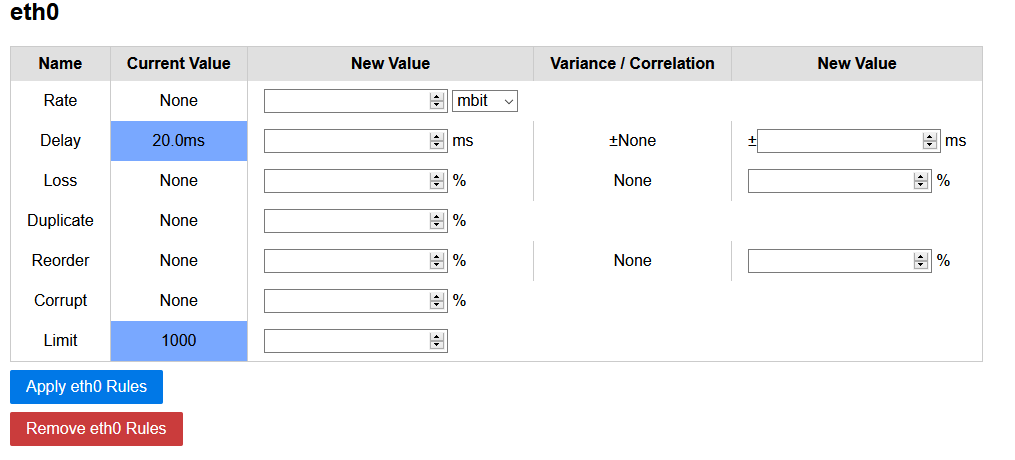
A lightweight Python-based Web-GUI for Linux traffic control (tc) to set, view and delete traffic shaping rules. The Web-GUI is intended for short-term isolated testbeds or classroom scenarios and does not contain any security mechanisms.
Requirements
netemtools &python3-flaskare required- Ubuntu 18.04 : Install with
sudo apt install iproute2 python3-flask - Ubuntu 20.04 : Install with
sudo apt install iproute2 python3-flask - Ubuntu 22.04 : Install with
sudo apt install iproute2 python3-flask
- Ubuntu 18.04 : Install with
- More information:
Usage
Execute the main.py file and go to http://localhost:5000:
sudo python3 main.py

--ip IP               The IP where the server is listening
--port PORT           The port where the server is listening
--dev [DEV [DEV ...]] The interfaces to restrict to
--regex REGEX         A regex to match interfaces
--debug               Run Flask in debug mode
The tool will read your interfaces and the current setup every time the site is reloaded
Docker
You can use docker to run this application. Run with host network (--network host) and network admin capabilities (--cap-add=NET_ADMIN). Site will be available on default port Ex: http://dockerhost:5000
docker run -dit --restart unless-stopped --network host --cap-add=NET_ADMIN ncareau/tcgui:latest
You can change the configuration using these Environment Variables:
- TCGUI_IP - Default
0.0.0.0- Use to change listening address - TCGUI_PORT - Default
5000- Use to change the listening port - TCGUI_DEV - The interfaces to restrict to
- TCGUI_REGEX - A regex to match interfaces
If using an interface bridge, docker might cause issue with the bridge. (askubunut)
To fix this, create a file /etc/docker/daemon.json with the following contents:
{
    "iptables" : false
}
Test & Develop
You can use the supplied Vagrantfile to test tcgui quickly. Vagrant will setup two machines, sender (192.168.210.2) and a receiver (192.168.210.3):
vagrant up
Afterwards connect to the sender and start the GUI:
vagrant ssh sender
cd /vagrant
sudo python3 main.py --ip 0.0.0.0 --debug
Start a receiver in the receiving VM:
vagrant ssh receiver
iperf3 -s
Send a packet stream from the sender to the receiver:
vagrant ssh sender
iperf3 -c 192.168.210.3 -t 300
Now access the GUI at http://192.168.210.2:5000/ and change the rate of interface eth1. You should see the sending/receiving rate to decrease to the set amount.
pre-commit git hooks
Setup
We use pre-commit to manage our git pre-commit hooks.
pre-commit is automatically installed from requirements.txt.
To set it up, call
git config --unset-all core.hooksPath  # may fail if you don't have any hooks set, but that's ok
pre-commit install --overwrite
Usage
With pre-commit, you don't use your linters/formatters directly anymore, but through pre-commit:
pre-commit run --file path/to/file1.cpp tools/second_file.py  # run on specific file(s)
pre-commit run --all-files  # run on all files tracked by git
pre-commit run --from-ref origin/master --to-ref HEAD  # run on all files changed on current branch, compared to master
pre-commit run <hook_id> --file <path_to_file>  # run specific hook on specific file